Text Normalization Explained: The Secret to Clean Data & Better SEO
Text Normalization Explained: The Secret to Clean Data & Better SEO
Have you ever copied a snippet of text from a PDF or a website, pasted it into your CMS or code editor, and watched everything break?
Or perhaps you’ve stared at a database query that returned zero results, even though the search term "keyword" looked exactly like the entry "keyword "?
The culprit is almost always dirty, unnormalized text. To the human eye, the text looks fine. To a computer (and Google's crawlers), it's a mess of invisible characters, mismatched encodings, and trailing whitespace.
In this guide, we explore why Text Normalization is mandatory for modern SEO and data processing, and how to do it correctly.
What Exactly is Text Normalization?
In the world of data science and web development, Text Normalization is the process of transforming text into a single standard form (canonical form).
Think of it as "deep cleaning" your content. It involves:
- Unicode Normalization: Ensuring that characters like
éare stored consistently (e.g., converting NFD to NFC standard). - Whitespace Trimming: Removing the "phantom spaces" at the start and end of strings.
- Sanitization: Stripping out invisible "gremlins" like Zero-Width Spaces (ZWSP) or Non-Breaking Spaces (
The "Silent Error" Example
Imagine two users trying to log in. To you, their usernames look identical. To the server:
- User A:
JohnDoe(7 characters) - User B:
JohnDoe(8 characters - Note the trailing space)
Without normalization, User B fails to login. This is a classic data integrity failure.
Why Does Raw Text Cause So Many Problems?
Text is rarely just "plain text" anymore. It carries the baggage of its source:
- The PDF Copy-Paste Curse: PDFs are notorious for adding weird line breaks and hidden symbols.
- The "Smart Quote" Issue: Word processors often convert straight quotes (
") into curly quotes (“”), which can break HTML and JSON code instantly. - Inconsistent Casing:
SEO Strategy,Seo strategy, andSEO STRATEGYare treated as three different entities by many algorithms.
If you don't normalize, you risk duplicate content issues, coding bugs, and messy analytics reports.
The Impact of Text Normalization on SEO
You might think text formatting is just a visual thing. It's not. It's a Technical SEO factor.
1. URL Slug Consistency
Google prefers clean, readable URLs. A normalized workflow ensures your URLs are generated correctly:
❌ Bad: domain.com/blo%20g-post-with-weird-spacing
✅ Good: domain.com/blog-post-with-weird-spacing
👉 Tool: Use Remove Diacritics/Accents to generate safe URL slugs.
2. Avoiding "Thin Content" Penalties
If your website generates dynamic pages based on user searches, unnormalized text can create thousands of near-duplicate pages (e.g., separate pages for "Keyword" and "keyword"). This dilutes your ranking power.
The 4-Step Workflow for Perfect Text
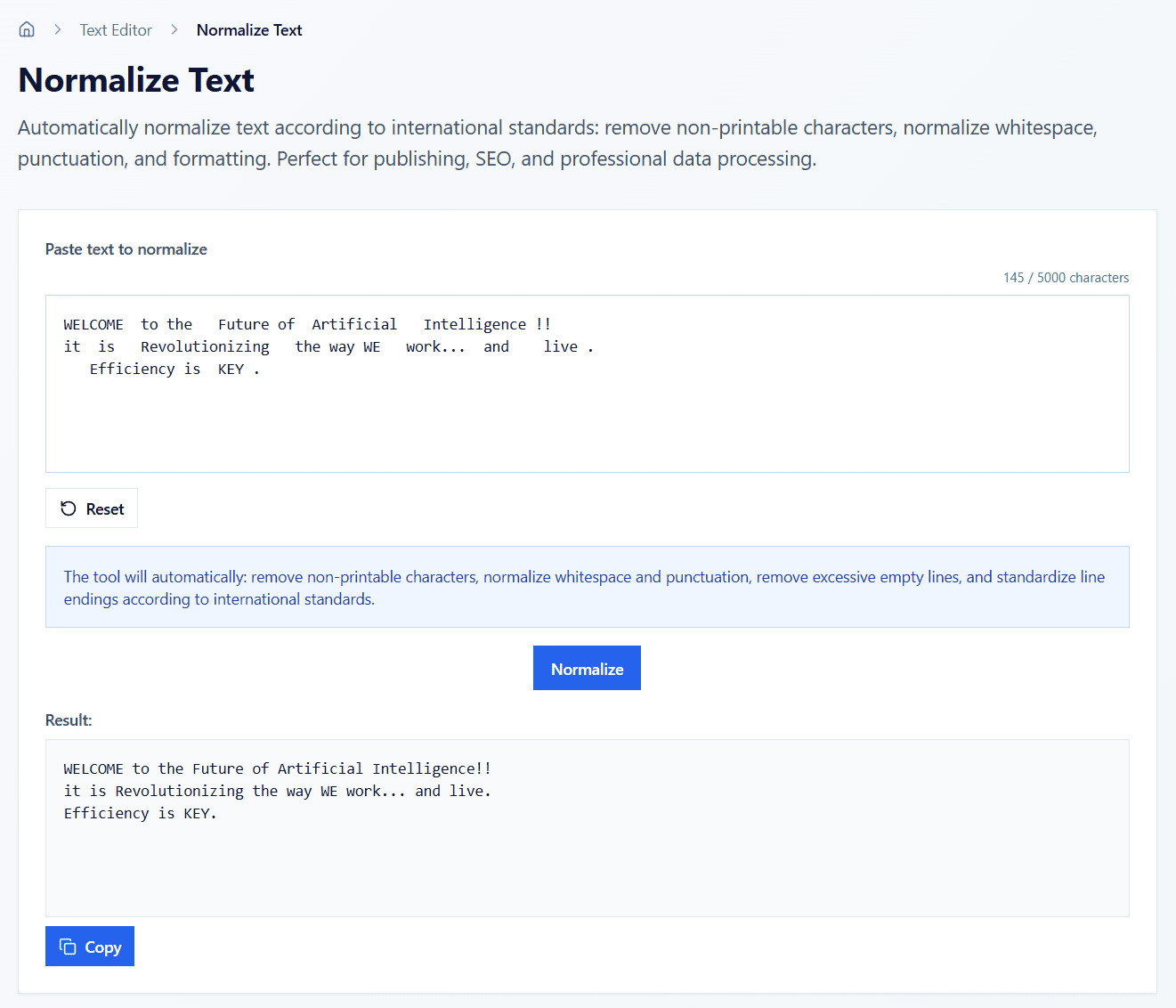
Whether you are a developer, a content editor, or a data analyst, follow this pipeline:
Step 1: Trim Whitespace
Always start by trimming the "fat". Remove leading/trailing spaces and collapse double spaces into one.
👉 Use: Trim Whitespace Tool
Step 2: Remove Special Characters
Unless you are writing code, get rid of non-alphanumeric noise that doesn't add meaning to your content.
👉 Use: Remove Special Characters Tool
Step 3: Standardize Case
Decide on a format. For headings, use "Title Case". For data tags, use "lowercase". Consistency is key.
👉 Use: Text Case Converter
Step 4: Normalize Unicode (Optional but Recommended)
Convert all characters to a standard encoding (usually NFC) to ensure they render correctly across all browsers and devices.
Why Use Client-Side Tools?
At Ezytools, we believe in privacy by design. Unlike many other online converters that send your data to a backend server, our tools utilize Client-Side Processing.
- Security: Your text (passwords, customer lists, private emails) never leaves your browser.
- Speed: Zero latency. No server round-trips means instant results.
- Reliability: Works even if your internet connection drops.
FAQ
Does normalization change the meaning of my text?
No. Normalization strictly deals with formatting and encoding. The semantic meaning of your words remains exactly the same—just cleaner.
When should I use "Remove Diacritics"?
This is essential when you need to convert international text (like names with accents: José, Müller, Tiếng Việt) into "ASCII-safe" formats for usernames, email addresses, or filenames.
Is this useful for coding?
Absolutely. Cleaning JSON strings, formatting SQL queries, or preparing CSV data for import are the primary use cases for these tools.
Explore Our Toolkit
Ready to clean up your data? Start with our most popular free tools:
- Normalize Text - The all-in-one cleaner.
- Word Counter - Analytics for your content.
- Case Converter - Fix accidental Caps Lock instantly.
The Bottom Line: Text normalization is the foundation of clean data. Whether you are optimizing a website for Google or preparing a dataset for AI training, skipping this step is a recipe for errors. Make it a habit to normalize your text before you hit "Publish" or "Run".